Home Security Systems Compared (2026): Ring, SimpliSafe, ADT, and Wyze
Updated 2026-08-22

The kit price on the box is the smallest number in what a home security system actually costs. The real total is kit price, plus whatever additional sensors your specific home needs beyond the starter count, plus a monitoring plan that in most cases runs for as long as you own the system. This roundup breaks all three out separately for four real systems, rather than comparing box prices as if that’s the whole story.
Quick comparison
| System | Kit price | Monitoring required? | Monitoring cost |
|---|---|---|---|
| Ring Alarm (8-piece) | $249.99 | No, optional | $0 self-monitor / $20/mo professional (Ring Protect Pro) |
| SimpliSafe (8-piece) | $179.99 | No, optional | $0 self-monitor / $22.99+/mo professional |
| ADT Blu (starter kit) | $249.00 | Yes, plan required | $14.99/mo self-monitor / $24.99-$34.99/mo professional |
| Wyze Home Security Core Kit | $39.95 | No, but monitoring is the whole point | $9.99/mo professional (via Noonlight) |
Ring Alarm (8-Piece Kit)
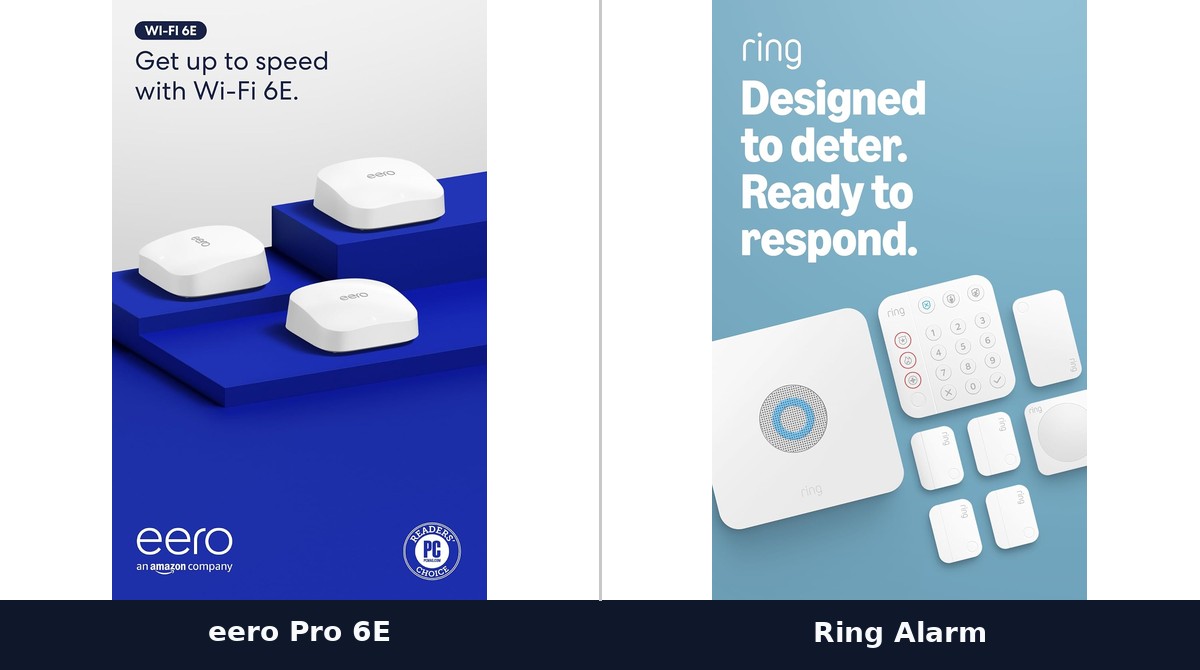
$249.99 for base station, keypad, 4 contact sensors, motion detector, and range extender. Covers a 2-3 bedroom home per Ring’s own sizing.
Ring’s real advantage isn’t the alarm hardware itself, it’s the ecosystem: this is the system to buy if you already own or plan to own Ring doorbells or cameras, because they share one app and one arm/disarm state. Monitoring is genuinely optional: without a Ring Protect plan you still get mobile notifications and a local siren, you just lose professional dispatch and cellular backup if your Wi-Fi goes down.
The eero + Ring ecosystem
Amazon owns both eero and Ring, and the integration between them is real, not just shared branding: eero’s network can prioritize Ring device traffic, and Ring’s own eero-compatible hardware (Ring Alarm Pro folds an eero router directly into the alarm base station) exists specifically to keep cameras and sensors online even if your main internet connection drops. If you’re choosing a mesh router from our mesh Wi-Fi router guide and expect to add Ring later, eero is the router that actually integrates rather than just coexisting.
SimpliSafe (8-Piece Kit)
$179.99 for base station, keypad, entry sensor, motion sensor, and 4 additional entry sensors.
The most vendor-neutral of the four: no smart-home ecosystem lock-in, works with both Alexa and Google Assistant equally, and is the cheapest kit-plus-monitoring combination in this roundup if you do want professional monitoring ($22.99/month, the lowest professional-monitoring floor here). It’s the pick if you don’t already own Ring or Nest devices and don’t want the decision to be made by what ecosystem you’re already in.
ADT Blu (Starter Kit)
$249.00 for base hub, 3 door/window sensors, pet-friendly motion sensor, yard sign, and window stickers. A monitoring plan is required, not optional, starting at $14.99/month for self-monitoring or $24.99-$34.99/month for professional monitoring with police dispatch.
This is the one real structural difference in this roundup: every other system here lets you own the hardware and walk away with zero ongoing cost if you want to. ADT Blu’s plan requirement means the true first-year cost is $249 plus at least $180 (12 months at the $14.99 floor), and every year after that adds another $180+ regardless of self-monitoring or professional tier. That’s the tradeoff for ADT’s brand recognition and the physical yard sign, which does have real deterrent value independent of the monitoring itself.
Wyze Home Security Core Kit
$39.95 for hub, keypad, motion sensor, and 2 entry sensors, currently available as a certified renewed unit (the new version is out of stock as of this writing). By far the cheapest hardware in this roundup, and professional monitoring through Noonlight at $9.99/month is also the cheapest ongoing cost here if you want real dispatch, not just app alerts.
The tradeoff is scale and polish: 2 entry sensors covers maybe one door and one window before you’re buying add-on sensors individually, and Wyze’s build quality and app polish trail Ring and SimpliSafe in independent reviews. For a small apartment or a single entry point, it’s hard to beat on price. For a full house, the add-on sensor costs add up fast enough that SimpliSafe’s larger stock kit becomes competitive again.
The real total cost, year one
Assuming professional monitoring where available, and accounting for a typical home needing roughly double the entry sensors a starter kit ships with:
| System | Kit + likely add-ons | Year 1 monitoring | Year 1 total |
|---|---|---|---|
| Ring Alarm | ~$300 (kit + 2-3 extra sensors) | $240 (Protect Pro) | ~$540 |
| SimpliSafe | ~$230 (kit + 2-3 extra sensors) | $276 (Standard) | ~$506 |
| ADT Blu | ~$300 (kit + extra sensors) | $180 (self-monitor floor) | ~$480 |
| Wyze | ~$150 (kit + several extra sensors, cheap individually) | $120 | ~$270 |
Wyze wins on pure cost by a wide margin; the other three land within about $60 of each other once real add-on and monitoring costs are counted, which is a much smaller gap than the kit prices alone suggest.
Which one fits your home
- Renter, apartment, one or two entry points: Wyze. Cheapest hardware, cheapest monitoring, easy to take with you when you move.
- Already own Ring doorbells/cameras, or building on eero: Ring Alarm. The ecosystem integration is the actual product.
- No existing ecosystem, want the lowest ongoing cost with professional monitoring: SimpliSafe.
- Want a recognized brand and yard sign for deterrent value, budget for the required plan: ADT Blu.
See our mesh Wi-Fi router guide if you’re building out the network these systems (and their cameras) will actually run on.
🛒 Buy the Gear in This Guide
 Ring Alarm 8-Piece Kit (2nd Gen)View on Amazon →
 SimpliSafe 8 Piece Wireless Home Security SystemView on Amazon →
 ADT Blu Home Security System Starter KitView on Amazon →
 Wyze Home Security System Core KitView on Amazon →
As an Amazon Associate we earn from qualifying purchases, at no extra cost to you. Prices and availability are shown on Amazon's own product page, not here, since they change constantly.
☕ Coffee Corner
Compiling, deploying, or waiting on a render? Here's what to brew while you wait.


